Access that follows your team
One shared API key gives every agent in the company the same power as the person who created it, and keeps giving it after that person moves on. Toolspoke narrows a key to a project, to a toolkit inside it, to a named action, and caps it at what its owner can reach today.
- Three levels
- The project, the actions it allows, and the slice one agent key gets of them.
- Capped at the owner
- An agent key resolves to a person. It reaches the projects that person reaches now, not the ones they reached when it was issued.
- Checked on the call
- Not on the menu. A denied action is refused at the gateway and costs no credit.
How access is decided
Each level can only narrow what the one before it left open. Nothing further down widens anything, so a project's settings are the outer edge of what any agent in it can do.
The project
Who is on it
A project is public to the team or private to the people named on it. Anyone can create one and runs the one they created. Its admins add and remove people, install and remove toolkits, and delete it. Organisation owners and admins reach every project by role.
The toolkit
What the project allows
Inside a project, each installed toolkit's actions are switched on or off one at a time, for everyone in the project at once. What is stored is the list of what is off, so an action a connector adds in a later release arrives switched on rather than invisible.
The agent
What one key gets of that
An agent key is granted projects. Within a project it can be narrowed to particular toolkits, and within a toolkit to particular actions. Narrowing is read one project at a time, so a key held tight in one project still reaches everything installed in another, and a key narrowed nowhere reaches all of them.
A project switch is the one that applies to everybody. An action turned off there is off for every member and every agent key in the project, whatever any individual grant says.
One switch per action
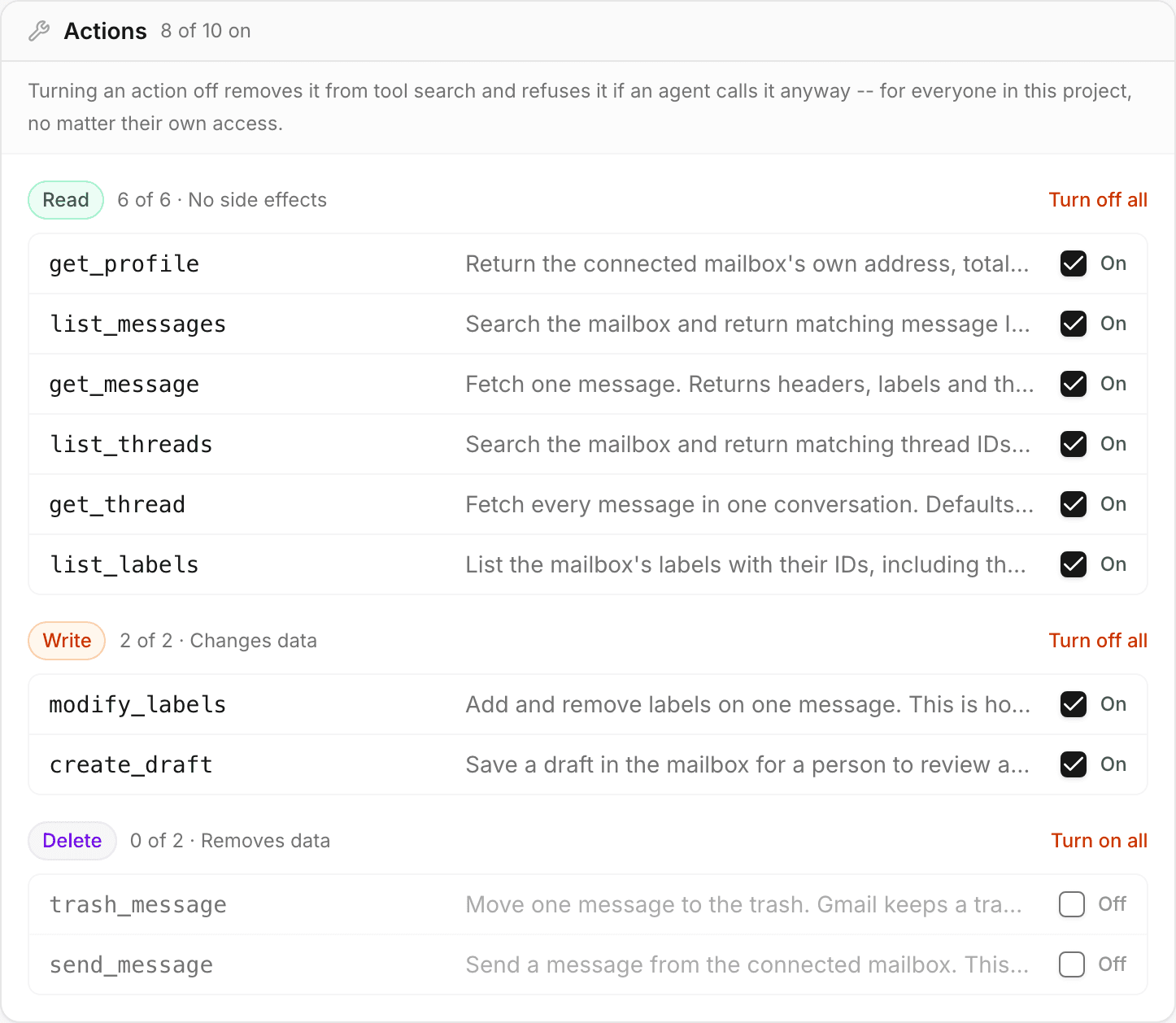
A project’s action screen groups an installed toolkit’s actions by what they do, with a switch on each one and a way to turn off a whole group at once. This is Gmail with its two destructive actions switched off.
What the switch writes down is a list of action names that are off. Everything else stays on, including an action the connector gains in a later release, which arrives visible rather than silently withheld.
An agent key belongs to a person
What a key reaches is worked out from its owner's access as it stands at the moment of the call, intersected with the grant the key was given.
Remove somebody from a private project and the projects their keys address shrink on the next call. Remove them from the workspace entirely and their keys stop resolving at all. There is no separate revocation step to remember, and no list of orphaned keys to go through afterwards.
This holds on both ways into the gateway: a raw agent key pasted into a config file, and a connector the person signed into over OAuth. They used to answer the question differently, which meant taking somebody off a project took it out of their browser and left it in their agent’s hands. One piece of code answers it now, for both.
The cost is real and worth stating: an agent stops working when the colleague who created it moves off a project. A project admin can hand that agent to somebody else, and the hand-over is written to the record, because it changes what a live token reaches without the token changing.
The key identifies a person
Resolving a key is a join against live workspace membership, not a lookup of what was true when it was issued.
The projects are intersected
The projects the key was granted, narrowed to the projects that person can reach right now. A key left holding none is inert rather than falling back to the whole team.
The project's own switch is applied
An action the project has turned off is refused here, and the refusal says the project turned it off, because it was not this caller's permission to lose.
The agent's grant is applied
Only then, and it can only subtract. An action the key was not granted is refused with a different sentence, one that names the grant rather than the project.
How actions are classified
Classification comes from the source where the source knows. An OpenAPI DELETE is destructive. An MCP server that sets destructiveHint is taken at its word. What is left is curated.
- read
- No side effectsFetching an issue, listing messages, running a query.
- write
- Changes dataOpening a pull request, posting to a channel, updating a record.
- destructive
- Deletes dataDropping a branch, deleting a file, closing an account.
What the classification is for
It groups a toolkit’s actions on the screen above, so switching off everything destructive is one click rather than a pass down a list.
What it is not for
It is not a standing rule. There is no grant that means “read-only, whatever gets added later”, and an unclassified action is shown under write so that picking the read group never sweeps it in.
The check runs on every call
A tool an agent may not call is not offered to it. Search does not return it, the catalog does not list it, and a model that never sees an action does not try to invent a reason to use it.
Hiding is not the enforcement, though. The check runs again when the call arrives, so an agent that guessed a tool name, or held one from before a policy change, is refused all the same. A refused call is not sent to the provider and is not charged.
Where a method cannot tell read from write, the body is inspected instead. A GraphQL request carrying a mutation under an operation marked read is refused, at build time and again at call time, so a classification a screen shows cannot quietly be wrong about what the call does.
Who can change what
- Create a project
- Anyone in the workspace. The person who creates it is its first admin.
- Add people, flip it public or private
- That project's admins.
- Install a toolkit, switch its actions on and off
- That project's admins. A member of the project who is not an admin is refused by the API, not just by the screen.
- Reach every project regardless
- Organisation owners and admins, by role.
Where to go next
Give each agent the tools it needs
Start with 5,000 credits and one seat. No card required.
The project, the toolkit and the agent key are three separate checks, and all three run when the call arrives.